Wednesday, November 12, 2008

Fujifilm Finepix F31fd versus Panasonic LX3 for Low Light Supremacy

Ok, these two aren't really in the same league. The Panny is a serious camera with amazing ergonomics and a smoking good lense, albeit way too short (booooooo!)

But the Fuji Talk Forum has been desperately searching for the next great compact Fuji camera for social situations ... the last one was the amazing F31fd. This is a camera that is so smooth at 800ISO that it defies logic. A sensor the size of your little finger nail with noise characteristics better than some of the crappier dSLRs ... (you know who you are ...)

DPReview performed a full review the LX3 and gave it a highly recommended. But they found that low contrast detail, a perennial problem in small sensor cameras, was not handled well. Panny have always had noise issues and over-zealous NR. The LX3 is much improved, but still not where it should be for the price.

I always enjoy Thom Hogan's reviews, and he looked over the LX3 against the stunning Canon G10 and the rather mediocre Nikon P6000 (why Nikon, why?) The LX3 should have won, but Canon has done wonders with their processing with some of the tiniest photosites yet ... and the Canon walked away being the only one Thom thought could do a decent 800ISO. I certainly think it does alright, because it retains a decent amount of detail.

http://www.bythom.com/compactchallenge.htm

Anyway ... back to the Fuji issue. The debate has been raging in a thread over there, based on someone's work on the DPReview sample images. The NR was a bit heavy handed and did not show enough to declare a winner. So I thought I'd apply my Neat Image skills to the problem and see what I could coax out of these two.

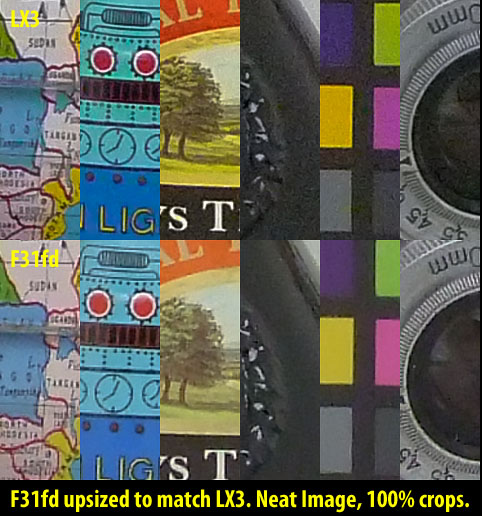
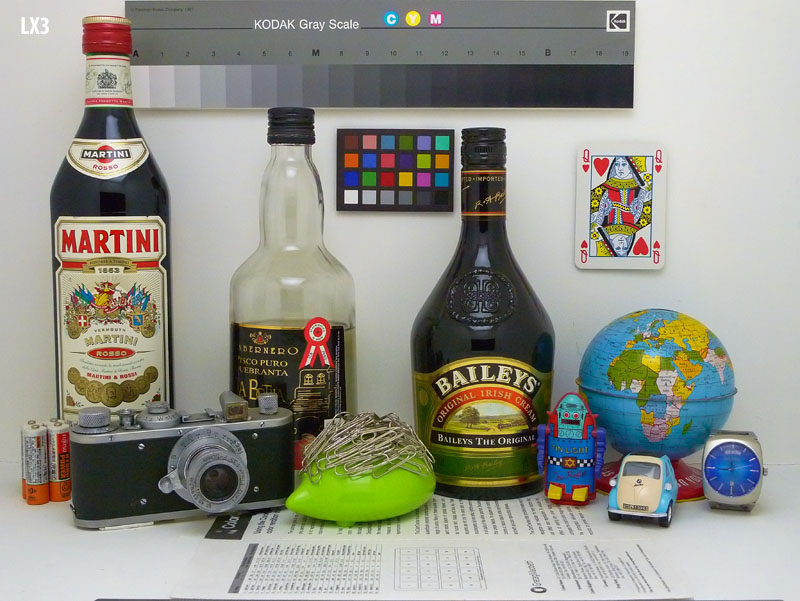
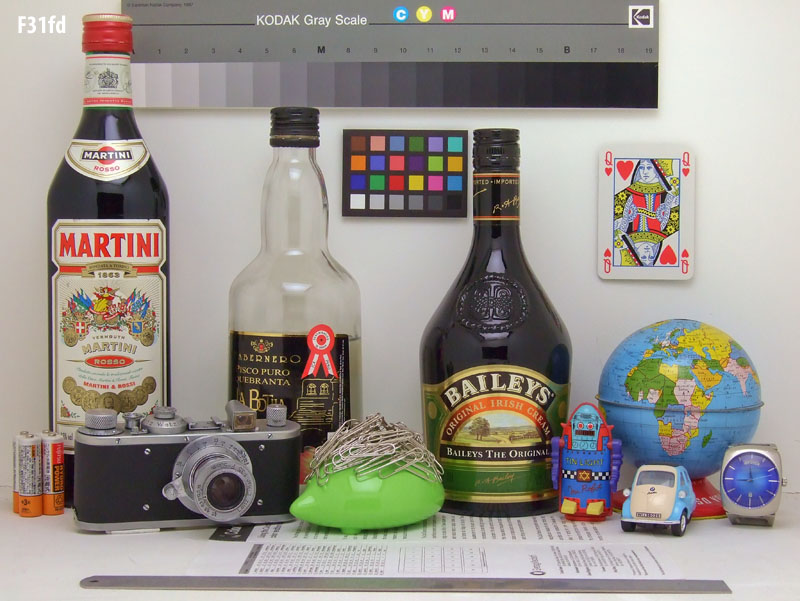
The result was, in my opinion, a virtual tie. Kudos to the LX3. Here are the 800ISO crops (click to expand the images):


As you can see, the two are pretty close at 100%. Factor in paper and ink and even fairly big enlargements will look similar. Although the Fuji will look smoother in dark areas. You can see that with the lense crop, the Baliet's bottle crop, and the color card crop.

On the other hand, the Fuji has some weird edge artifacts. That is most obvious on the lense crop with the jaggies all over the little details around the silver parts.

I think the Fuji's NR is a big over-aggressive as well ... this being most obvious on the Bailey's label. The tree in the Panny image definitely has more detail.

Still ... overall, the detail is about the same (see the glove crop) ... leaving one to wonder where the extra 4 megapixels went?

So ... pretty much a tie. If only that LX3 lense were not so darned short :-(


I think these would make fine prints, but the situation would be quite different were there hair or distant foliage in the image. We'd be looking at lots of clumping in the Panny image ... and some in the Fuji image too. But I am pretty sure the Fuji would be a little better.

Sunday, November 9, 2008

Deal of The century! WACOM BAMBOO FUN!

I was poking around on fredmiranda.com's for sale forum and saw a WACOM BAMBOO FUN tablet for sale for $60usd. This seemed quite reasonable, so I took a look around and found out that these are very decent beginner tablets. The kind that non-artists can use for illustration, editing and even navigation. Vista has been pen-enabled, so is quite friendly to the use of a pen instead of a mouse.

I checked the prices here in Canada and found them quite reasonable. Future Shop has the best prices right now, with the basic BAMBOO selling for $69.99cad and the more advanced BAMBOO FUN selling for $99cad in its small form. Note that the small form is perfectly fine for most purposes, and in fact I find it already a bit large for pen navigation as you have to move your arm pretty far to address the edges of the screen.

The BAMBOO FUN comes with extra goodies, which should be quite worthwhile for many people. First, it has a nice looking table, which also comes in three colors. I purchased basic black. With the glowing navigation circle, it looks very cool. It also comes with a mouse, which basic BAMBOO does not. This mouse never needs batteries, yet is wireless when used with the tablet. Very nice.

But the real kicker is that you get very recent versions of Adobe Photoshop Elements, Corel Painter Essentials and NIK Color Effects Pro. Elements is now at version 6 in the package, which is a heck of a deal, as you get Adobe Camera RAW 4.6 with support for the most recent cameras in it. And you get keys that are upgradeable!

So this qualifies in my opinion as an amazing deal. An excellent beginner's tablet plus world class photo editing and organization software for a hundred bucks. And fully upgradeable to the latest version, which has just been announced (Elements 7 with ACR 5.)


Consider giving this a try if you have ever thought about using a table for editing, illustration or navigation. It's pretty cool ...

Saturday, November 8, 2008

Crop Factor affects the apparent Depth of Field

The topic of crop factor and depth of field comes up once in a while in debates on the net. Specifically on certain forums on DPReview.com, where there are people who consider an extremely limited range of depth of field a virtue ...

Some people do not believe in the NxA Rule, something I picked up on a web site that is sadly no longer visible. However, this rule tends to work out, despite its rudimentary approach to the topic. Basically, N is the *crop factor* from the camera's sensor size to a full frame sensor size. Roughly, this corresponds to the diagonals of the two sensors.

A Fuji F11 (my favourite compact until they release something that is truly better feature for feature) has a 1/1.7" sensor, which has a diagonal of 9.5mm. A Nikon D300 (my favourite dSLR until I win the lottery and grab the D700 and a selection of appropriate lenses) has the Nikon APS-C variant, which has a diagonal of 28.4mm. And a full frame camera (any 35mm film, and the majority of full frame digital SLRs like the aforementioned D700) have sensors with a massive diagonal of 43.3mm.

So the crop factors for the Fuji F11 and D300 are 4.56 and 1.47 respectively. Interestingly, this disagrees with Fuji's reported crop factor (FOV factor if you will) of 105mm effective at 24mm actual. That makes it a 4.38 crop factor. No matter, they are close enough.

What this means is that a D300 shot at f2.8 will have an effective DOF (relative to the FF camera) of 1.47(N)*2.8(A) which comes to f4.1. The F11 shot at f2.8 will have an effective DOF of f12.7.

That's some kind of difference. In fact, it makes it nearly impossible to get pleasing bokeh from the F11. Only in extreme macro situations can the background be smoothed out really nicely. This is why the debates rage in the forums ... compact and bridge cameras are considered by many to be unsuitable for any photographic pursuit where pleasing bokeh is a requirement. But they have their defenders, who staunchly suggest that dSLRs cannot get the same DOF and therefore are actually less appropriate for certain types of photography, the primary example being landscape photography.

One problem, of course, is that most bridge cams and compacts have only a few apertures available at full zoom to keep their lenses reasonable in size. The F11 has a range from f5 to f8, which is 2.33 stops. The S100fs bridge cam goes from f5.3 through f8 in automated modes (a hair over two stops) and adds f11 (ok, does this get confusing with the Fuji's model or what?) in manual modes (a hair over three stops.) I.e. they all start pretty high in the range at full zoom.

So what does this mean in practice? Well, it means that the subject isolation and bokeh you will get on the dSLR shot at anything below about f16 is simply unattainable on the small sensor cameras. Whaaaaaaat, you say? No, it's true. The crop factor predicts something close to this, and a demonstration shows it pretty clearly. It also shows that the maximum DOF is pretty close between the two, although in both cases one is reaching into diffraction-limited territory.

I shot a series of images from a tripod placed less than 2 feet from my subject, a Kirk Enterprises D2 L-Bracket lying around from the days when I owned a D2 series camera (eventually I'll get it together and sell the darned thing.) There are boards stacked against the wall between 12 and 15 feet behind this subject, which make a pretty good test. By the time they come into partial focus, we're well into the teens in aperture. At least, at macro ranges.

A note: At macro ranges it is my experience than you can shoot at minimum aperture (f8 for the F11 and f32 for the lense used on the D300) without significant diffraction impact. I presume that this is caused by the magnification of the subject.

When I shoot the F11 at 105mm to match the lense I had on the D300, I start at f5 and shoot at f5.6 and f8 as well. These should line up somewhere around f15 through f24 on the D300, but my experiment shows it to be more like f16 through f32. This probably because the Fuji could not focus as close, even in macro mode and had to be moved back a few inches. This does not invalidate the test because the relationship between subject distance and background distance is pretty vast and is hardly affected by this slight change.

So ... here is what it looks like. (Click on it to see it at its full size.)


And here is a second test, created when challenged by a user on the Fuji Talk Forum. I was extremely careful to match effective focal lengths and subject distances ... and the result was the same. This is also not a macro shot, with the subject distance to background distance ratio being closer to 1:5 this time.


From this experiment, we can conclude two things:
  • Small sensor cams have great difficulty isolating subjects.
  • Large sensor cams are able to pretty much duplicate the wide DOF of small sensor cams because of their much larger range of useful apertures.
And remember that the difference is maintained as subject distance increases in relation to background distance. So dSLRs have to use lenses with much wider apertures to get any subject isolation from a distance. While they have little trouble getting most everything in focus at long landscape distances without resorting to their maximum diffraction-limited apertures.

There is a slight advantage to small sensors when one wants to shoot something very close to the lense (e.g. a flower) while still retaining the field in good focus. This requires decent apertures to maintain shutter speeds yet requires very wide depth of field from close distances. Since this is usually done at wide angle, the problem is not as severe as with the telephoto macro examples shown here, but it still exists. Raising ISO helps (and there is a lot of headroom there in modern dSLRs) .... but what really does the trick is the tilt-shift lense, which is available for all dSLRs. This lense reorients the plane of focus to match the plane of the sensor, allowing stunningly wide apparent depth of field ...

I have to say that I prefer the wide range of options to the rare convenience offered by the small sensor camera. Of course, the solution is to own both and shoot the small sensor camera when it really does have the advantage. The Canon G10 is likely to follow the G9's success as the backup / travel cam for many dSLR owners because of its dSLR-like control and compact size. But I very much hope that Fuji releases a real competitor once again ... rejuvenating the E-series camera line would be a great thing ...

Wednesday, October 29, 2008

Noise Reduction Face-Off -- Neat Image, Topaz Denoise, ACR 5

I've been a heavy user of noise reduction for years now. I latched onto Neat Image pretty early and have been happily using it until very recently. I became a tad disgruntled when I purchased Photoshop CS4 and found that the 32 bit plugins I owned did not work in the 64 bit version of CS4 ... obviously Adobe created no thunking layer to bridge the two worlds.

And only PTLens (excellent lens distortion plugin) was already shipping a 64 bit version, at no extra charge. I got upset because I had not managed to install both version of CS4, so I was unable to use my favourites. Luckily, someone mentioned on a forum that both were installed by default, and I remember having a glitch in my install and having to redo it. So I explored the installer yet again and managed to get everything installed for both 32 bit and 64 bit CS4.

By this time, I had found Topaz Adjust and Topaz Denoise, and although they have no 64 bit versions, the plugins intrigued me. They use a new noise reduction technology (so they say) for Denoise and a cruder, but sometimes nicer, method in Topaz Adjust. Topaz Adjust can do amazing tricks with contrast, detail and color, and creates effects that range from Orton to Dragan. Really arty stuff. With a gentle touch on the controls, it can do a really nice job of simple contrast and detail adjustment.

Topaz Adjust was on sale for $38 usd and Topaz Denoise was thrown in for free, as it was new. This was unresistable to me, so I acquired it. And I have certainly enjoyed the plugin. One example of a fairly tame adjustment to add some pizzaz is this close up of the facade of the Parliament Buildings in London. I shot it from the top of a bus on a tour. The weather was mid-day sun and the image has a rather boring snap shotty look to it.

After a little work with Topaz Adjust, the image seems to become vibrant and detailed. There is just more interest in looking at it. And the balance of colour and contrast is such that it will look much nicer in a print. It almost sparkles now.


Definitely something to look at for the price.

Now, Topaz Denoise is a more interesting beast. It handles details better than anything I've ever seen. You can absolutely hammer a background or sky to smooth plastic and the details in the rest remain almost untouched. It has its issues of course, sometimes it bands smooth areas like skin, but for complex images with lots of noise, it can work magic.

Downside? It's unbelievably slow in its best mode. A 12mp image from a D300 can take 10 ro 15 seconds for Neat Image to process. The same image in Denoise can take 6 minutes!So choose your images with care. Neat Image remains a superb general purpose noise removed.

And what about ACR 5? Turns out that you can get great results with that one too. And there is no time penalty at all. Dial in the noise settings and the conversion does the noise in the same time as everything else. Very impressive.

I decided to perform a simple test on a jpeg from a few years ago. A balloon race late in the evening shot by a D70s at high-ish ISO (800.) There is some noise, but I nailed the exposure and it's not bad. Mostly color noise and a bit of grain.

Here is an image containing four crops at 100 percent ... double click on the image to see the full size. You'll see some grain that is mostly removed by Neat Image and completely wiped out by Topaz Denoise. Denoise is almost too effective. ACR 5 does a nice, balanced job. Note how the trees and leaves in the background are hardly affected at all. I used a bit of Y channel sharpening at high frequency to pull Neat Image back into line. Topaz Adjust hardly touches detail. And ACR 5 is pretty good so long as you control the amount of luminance noise you allow it to touch. I added a touch of sharpening to ACR 5 as well.

Any of these would print very well and I would not presume to choose between them. I plan to keep and use them all. Again, double click on the image to open the large version.

Apple and Rogers ... is data a new street drug?

Ok ... I don't like hate blogs. I have no desire to attack the company to which I pay a small fortune each month for my Internet, three wireless accounts and my digital cable services. And yet ... I am just about ill to see the prices they are suddenly charging for the iPhone.

The iPhone came out on a promotional price for about the same cost as the US prices. $199 for the 8GB unit and $299 for the 16GB unit. For those whose voice plans were under $30, there was an extra gouge, er, fee of $50 as a penalty. (For being a customer I suppose.)

I can live with all that ... my wife purchased one and my son got one at this promotional price. My wife got the $30 per month 6GB data plan, only about infinity less than what you get for that price in the US, but hey ... this is Rogers. My son got it without the data plan and racked up $50 in about 8 hours of light usage before I spent almost 3 hours on the phone with them before they found someone who knew how to disable the 3G network in the phone.

I could not get one, because I had upgraded to the Blackberry from hell last year and had to wait until September.

Well ... I traveled to the UK in the last week of September and didn't get back until the 28th. I didn't even think about the upgrade again until today. I almost missed a dental appointment (they called me 20 minutes into it to ask why I had missed, but I rushed over.) I later realized that this was because my Blackberry had reset the time again to one hour off ... so the alarm went off to taunt me while I was at the dentist. This was the third time something like that happened, the phone has other horrible quirks like radio going off and staying off ... that kind of thing. A junker.

I decided that enough was enough and I would finally go for my upgrade to the 16GB 3G as I also need a new iPod (mine is used as the music device for the car now.) Well ... I walked over to the local Rogers, which is 3 doors down from my dentist, and the fella called up my account and expressed surprise that the prices had just jumped by $100. I was stunned, because I had heard nothing of it.

I left the store steaming mad (like you get when you decide to spend money and someone stops you :-) and decided to call Rogers later to find out what was going on.

I just got off the phone with them after waiting a short 20 minutes (short for Rogers that is) ... and I am stunned at the avarice ... the price jumped $100 after the "promotional" price expired at the end of September. Interestingly, the fella at the store said "I haven't sold a phone for a few days and this is new" ... so who do we believe?

Anyway ... that's the price. We are now officially 50% more expensive than the price of the same upgrade at AT&T.

She also repeated the often used bullsh*t that my $35 rip-off, er, administration fee could not be waived. So I ran out of patience and politely (it's true) asked to speak to her manager. Five minutes later she returned to me with the good news that she could waive the fee. What a shock. I only pay them $350 plus every single fricken month.

And I get a wonderful $50 rebate (assuming I remember to send it in) off my phone charges later ... woopee. So I think about it and decide that a total price of $400 might be tolerable. I ask ... how much for the data plan? Remember, Rogers customers were being ripped off for, er, paying $30 per month for a lousy 6GB and that "promotion" has apparently run out.

The news was grim ... for $25 MB, I could get 500MB. !!!!!!! WTF????? That's the size of a single CD. Yes ... ONE CD ....

The price for 8GB (only 30% more than the 6GB offered during the promotion) is now ... wait for it ... $80 per month! GAK. I swallowed a bug. And choked on my vomit.

Sorry ... enhance your calm ...

The price of the phone rises 50% and the cheapest data plan price rises 1000% ...

Yes, the price of data has gone up by 10 TIMES.

Wow ..... 10 TIMES ... 10 TIMES ... 10 TIMES ... 10 TIMES ... 10 TIMES ... 10 TIMES ... 10 TIMES ... 10 TIMES ... 10 TIMES ... 10 TIMES ... 10 TIMES ... 10 TIMES ... 10 TIMES ... 10 TIMES ... 10 TIMES ... 10 TIMES ... 10 TIMES ... 10 TIMES ... 10 TIMES ... 10 TIMES ... 10 TIMES ... 10 TIMES ...

That's an ORDER OF MAGNITUDE in case anyone is interested.

Ok, I admit. I shouldn't blog when I am in shock.

By the way ... there was one cheaper data plan for $15 per month, I think it was enough to send 5 small images across the net ... I kid you not.

So ... maybe they are trying to align with the pay as you go data prices. After all ... this is pretty expensive, right? Well ... not so, Midas Muffler Breath. The pay as you go prices will take your beath quite literally away.

If you just use the data without a plan at all, the price is a nickel a kilobyte. So on the scale we have been using, that's 200 bytes per penny. Yes, 200 bytes ... or 0.0002MB per penny ... that's one person's really long name. And now we are at 1000000% ... yes, 4 orders of magnitude over the "promotional" price. That's actually quite a lot ...

Things are looking rather grim .... let's summarize these options:

"Promotional" price for 500MB at $30/6GB ... comes to $2.50 ... Not bad, although AT&T charges effectively 0 for high volume users so this is pretty high.

Current price for 500MB: $25 Hmmm ... that seem a bit stiff to anyone else?

Pay as you go price for 500MB: $25,000 Huh? Can this be right? $.05 per kilobyte times 1000 times 500 ... yup ... works out. If you look at images online for a few hours, you could end up buying Rogers a brand new car.

So ... what was I to do? I hung up of course. I couldn't even articulate my displeasure any more. Words utterly failed me.

Is there any industry in which it is legal to offer a promotional price that is 10 times cheaper than the real price? I don't think so. But I understand (from literature and television) that there is a thriving industry that regularly gets customers "hooked" on their product and then raises prices to exorbitant levels ...

Sunday, October 26, 2008

High ISO comparison Canon G10, Panasonic G1, Fuji S100fs

I've been agonizing over a couple of issues over the last 6 months.

First, I need a new concert camera. The F11 still works very well, but its video mode uses too much card space and its audio input is easily overwhelmed by heavy bass, making clips sound like they were recorded under water. Candidates for this position must be small enough to wear at the belt or carry in a jacket pocket. I.e. they must be sneakable into concerts here in Ottawa. None of the local venues allow anything that is or resembles a dSLR. Small is beautiful ...

Second, I would love to be able to travel with a smaller kit. I have been vacillating between the D90, which is smaller than my D300 but quite expensive, the D60, which is really small and still provides superb image quality, and a compact cam ... which has the advantage of size. The F11 is definitely not enough cam to take as my only capture device. The G9 grabbed me for a while, but the high ISO performance was pretty ordinary as low as 400. An excellent bridge camera like the Fuji S100fs would have sufficient high ISO to be useful and it has IS. But alas, it weighs as much as the D60 and my 18-200VR and is about the same size and more expensive! I'd need my head read if I took that route. The new G10 has improved the high ISO picture somewhat and apparently fixed a lot of what ailed the G9. It dropped some range unfortunately, but gained true wide angle.

The G10 actually looks like a serious contender. It is certainly small enough to carry into a concert. It would be a dream to travel with. What's not to like? Well, high ISO ... it's better, but is it good enough?

I like to shoot in churches when I travel. That means I shoot at 1600 or higher, even with stabilization. The G10 won't quite cut it. But I do carry a mini tripod now, so maybe I could use that (or a Jobo Gorillapod) to make up the difference. But I'd still need 800 ISO. For concerts, I have developed a style that works at 400 to 800 ISO, so testing at 800 covers both.

By the way, Panasonic has brought a new contender to the table as well. No, it's not the LX3. It's high ISO is nice, but not quite in Fuji's league in my opinion. More importantly, the lens's range is a joke. Good enough for street shooters and reporters ... maybe. No, I'm actually talking about the new hope, the micro-4/3" G1. A large(ish) sensor with a 2 crop factor, as opposed to the S100fs's 4 and the G10's 5. This gives the Panny a significant advantage in pixel size, since they kept the megapixels under control ... unlike the G10. That body and processor with the G9's megapixel count would have helped high ISO ... but oh well.

So the contenders so far are the G10 and the G1. I want to test them against the best small sensor camera at 800 ISO, so that would be the S100fs. It's not a contender for the role, but it's the benchmark for high ISO in a small sensor camera. (We'll see later how they all stack up to the dSLRs ...)

Since I do not have access to all of them, I need a source for some test images. The obvious choice is the test site Imaging Resource. I used to have some misgivings about the consistency of their lighting and focus, but these days they tend to use the same setups and lighting and they have a focus target in the specific series that I like to use for high ISO. I will show derivatives of these test images under fair use provisions for their copyright. Check out their site and try their comparometer ... it's very cool.

First off, what do I value in high ISO performance? I.e. what should I compare? Well, detail retention is the biggy. Smooth noise is trivial to accomplish, but do it while retaining detail ... that's the challenge. Many small sensor cameras are known for their difficulty in retaining low contrast fine detail in such things as hair, fur and grass. These tend to turn to mush because of noise processing, and many cameras start this degradation surprisingly early. Some at base ISO!

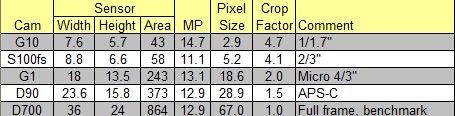
To explain this a bit further, here is a table that shows a few important parameters for the test. The G10 should really suck based on its photosite size. These suckers are tiny. The G1 has much larger photosites than the Fuji, and should easily beat it. But the Fuji jas dual advantages: the SuperCCD sensor, and Fuji's very nice jpeg engine.

Since I want to keep this fairly short, these three will be compared at 800 straight from the camera, and then with some limited processing -- a shot of Neat Image noise reduction and a shot of smart sharpening to pull out the most detail each can give without creating sharpening artifacts, like halos. In the interests of fairness, I upsized the Panny and the Fuji to match Canon's staggering resolution before processing them all to extract maximum detail.

So here is the first crop. All my processing was performed in the 32bit CS4, which I have had now for about 4 days. I'll try and blog what I like about it later ... but so far I really enjoy it. GPU features like bird's eye view and smooth and accurate scaling are worth the price of the upgrade alone (to me) but YMMV of course.

NOTE: For all of the images on my blog, click on the image to see a larger version. This is especially important for all the images in this specific post, as the second set of equalized crops are invisible until you open the image up to full size.
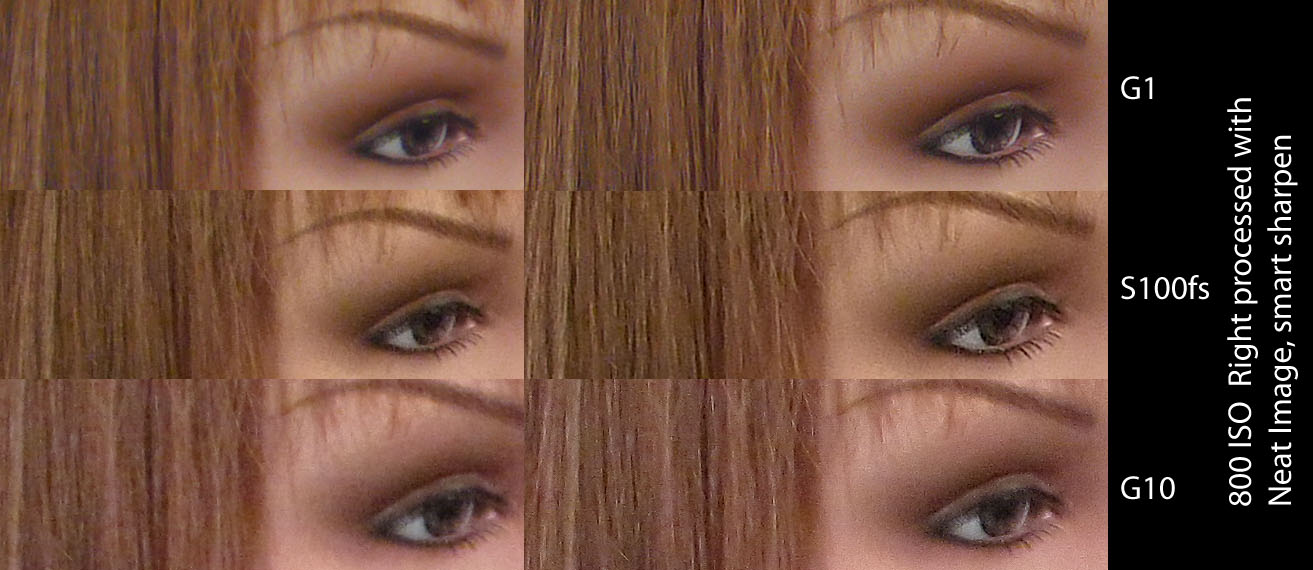

At 100% and straight from the camera (left hand crops), the G1 should stomp the others. But the Fuji is the winner before processing. Although the Fuji has grain, the Panny has a lot of color noise in very large blotch sizes, which is much uglier. It also has fairly low sharpening (which can no doubt be turned up in camera.)

The Fuji has some color noise, notably a big yellow blotch between the eye and the brow and some in the hair, but otherwise it has reasonably fine gran and reasonable detail in the hair. Note ... Fuji applies a lot of sharpening in camera, so this is just about all it's got, but it's good.

The G10 brings up the rear with disappointing color noise and severe loss of saturation. However, in the full sized images, it actually has the nicest tone curve. Much lower than the others, leading to a very open look. I actually had to add contrast to the G10, something I've never seen in a compact camera jpeg image before.

On the right side crops, you will see that the G1 and S100fs now appear tied. There is really nothing to choose, and if I'm being choosy, the nod would go to the G1 for less grain and fewer artifacts. Also, the G1 has a much finer appearance to the hair, the Fuji is still clumping while the Panny is showing much better detail now that a bit of sharpening was applied.

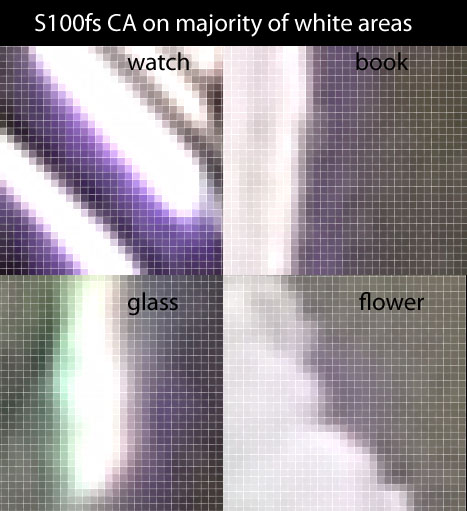
The Panny has one more advantage, it has almost no CA. In fact, none of the cameras have any significant CA in these images except one ... and some of you may have already guessed who the culprit is :-).

If you scan around the S100fs image at 100%, you will see that there is CA on almost every highlight. Some of these fringes are quite dark and rather wide. The following crops show the new individual pixel frame feature in CS4. These are high magnification so you can see what I am talking about ... 6 to 8 pixels is a little much. Doesn't show much at web sizes, but enlargements must be repaired before printing.


Anyway, the S100fs has never been a threat to join my dSLRs and compacts anyway, so back to the test. The Panasonic has the obvious edge over the G10. But once the saturation is bumped for the G10, and the detail is enhanced a bit further, say, using a plugin like Topaz Adjust (my new favorite toy), things equalize a bit further.

Just downsizing to web sizes makes a hug difference, as shown here:

You can see here that the Canon is slightly less detailed (but I've not done the secondary processing yet) and the saturation is lower, but otherwise it looks like the rest. Since I post the majority of my concert stuff on the web, I consider it at least in the game.

So let's see how the three of them look when fully processed, downsized for the web and sharpened.
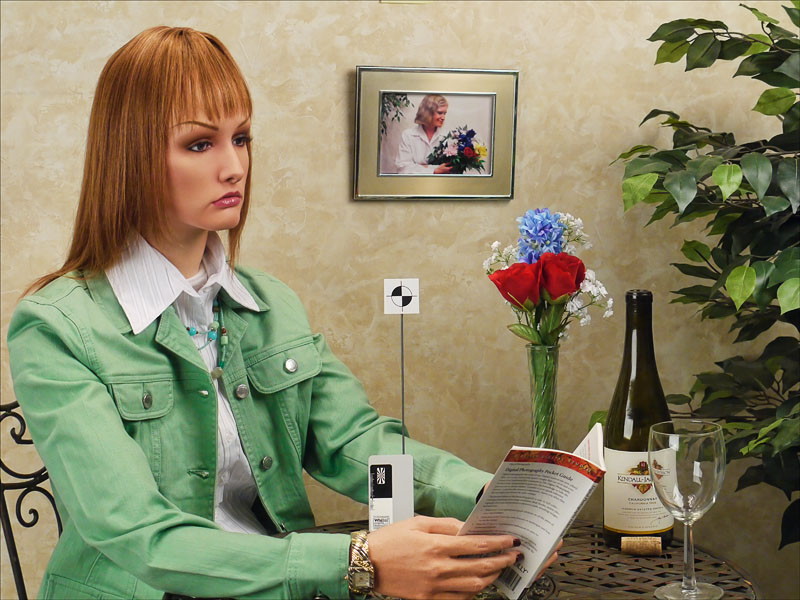
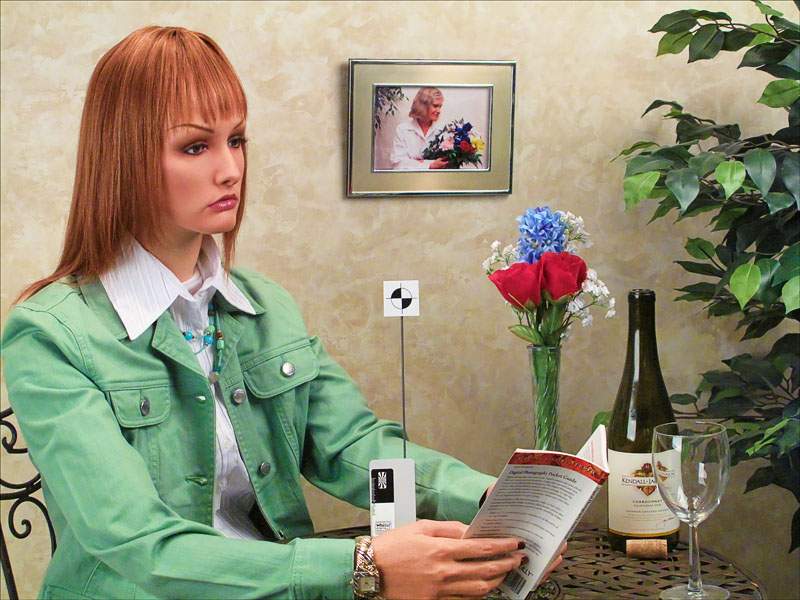
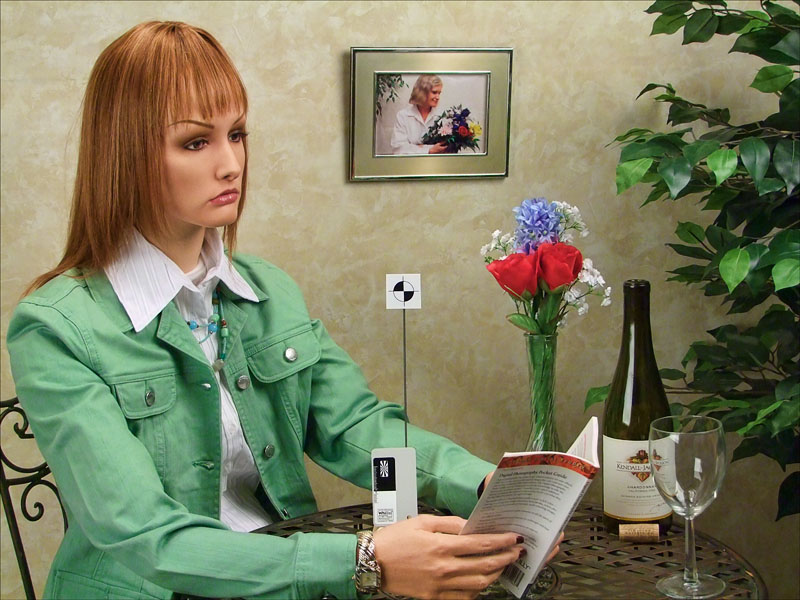

I'm deliberately not identifying which is which. They are all just fine in my opinion. So, at web sizes, it's a draw. And that makes the G10 the winner by a mile ... cheapest, most compact, tons of resolution, full manual, TTL flash, what's not to like?

I have further investigation to go though ... printing this 800 ISO image at 12x18 is an interesting test. I'll blog the result some day ... assuming I get the time to perform the test.

So ... we already know that images at web sizes are all pretty much the same. Can't tell anything at these sizes, which is a good thing. This makes all compacts useful for general purpose snap shooting. But just for shits and giggles, let's see how a real benchmark looks. Something that should perform superbly at 800 ISO ... the APS-C dSLR and the full frame dSLR. By lucky happenstance, the Imaging Resource site has a full set of these same images for the Nikon D90 and the Nikon D700. The D300 unfortunately does not use this same setup for its ISO series, so the D90 will have to do, despite its lower acuity (according to DPReview in this review.)

First, two sets of crops. The before and afters for the two dSLRs. I thought of adding these after the primary test was complete, so each gets it own little file.
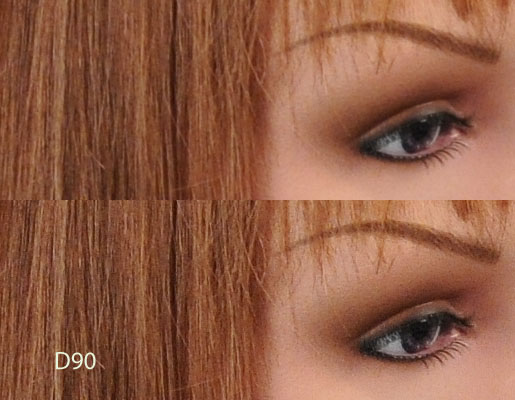
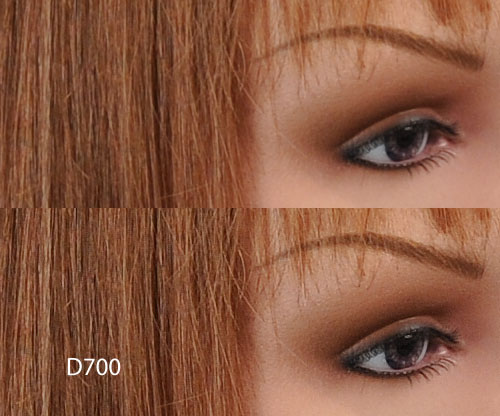
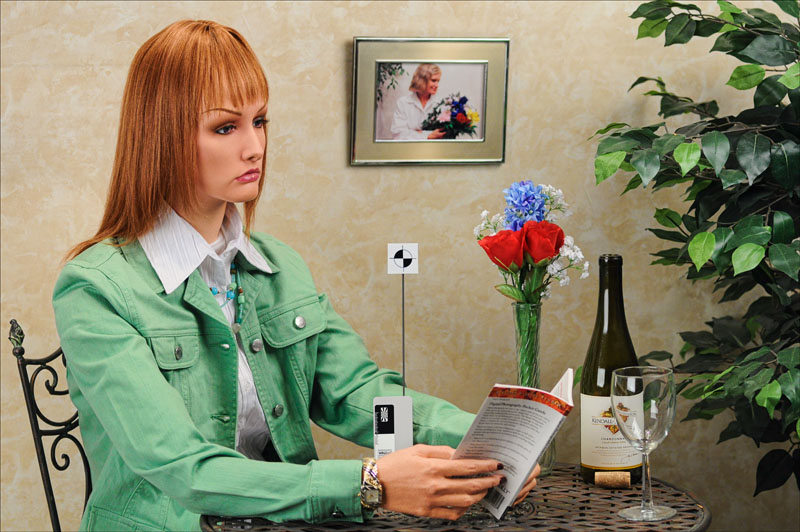
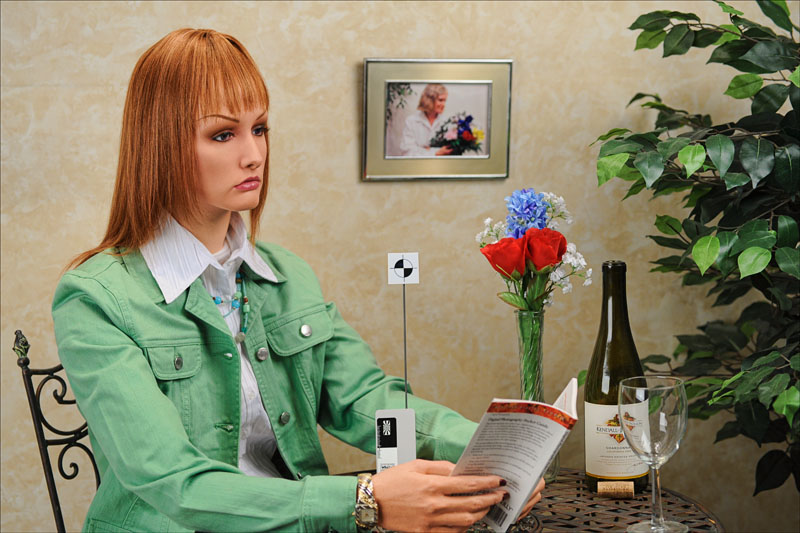
Note, no extra noise processing here at all. It's just not needed on either of these. The crops really show the differences as sensor size increases. Every hair is visible, no longer blending into clumps. Even the Panny, which has a fairly large sensor, clumps the hair a little. The Fuji does it a fair bit and the Canon does it aggressively.

But the dSLRs can't come to concerts and are heavier for trips. Still ... I carry the D300 when I travel because the images I get are well worth it so far. And I carry the F11 into concerts because these other contenders just aren't better enough to make me jump. Yet. But we'll see how the G10 fairs when I print. If it looks decent, it might be the one.

If you want some real fun, have a look at the D700 3200 ISO image at 100% ... wow. Far better detail retention than the smaller sensor cameras at 800 ISO. Even the 6400 ISO image retains better detail than the three smaller sensor cams at 800, although with considerable grain.

As good as these compacts are getting, they still disappoint a little at higher ISO. Perhaps we'll see a new APS-C compact from Nikon, something that Thom Hogan has speculated about (an educated guess I believe.) With Nikon's jpeg engine, this would open the door to some serious competition in the compact sector. I'd pay quite a premium to get real dSLR image quality in a compact body with lens compatibility. Here's hoping ...